SignalRGB WLED Clock & Pixel Art Plugin
Adding a little more fun stuff to SRGBMods' WLED plugin
Description
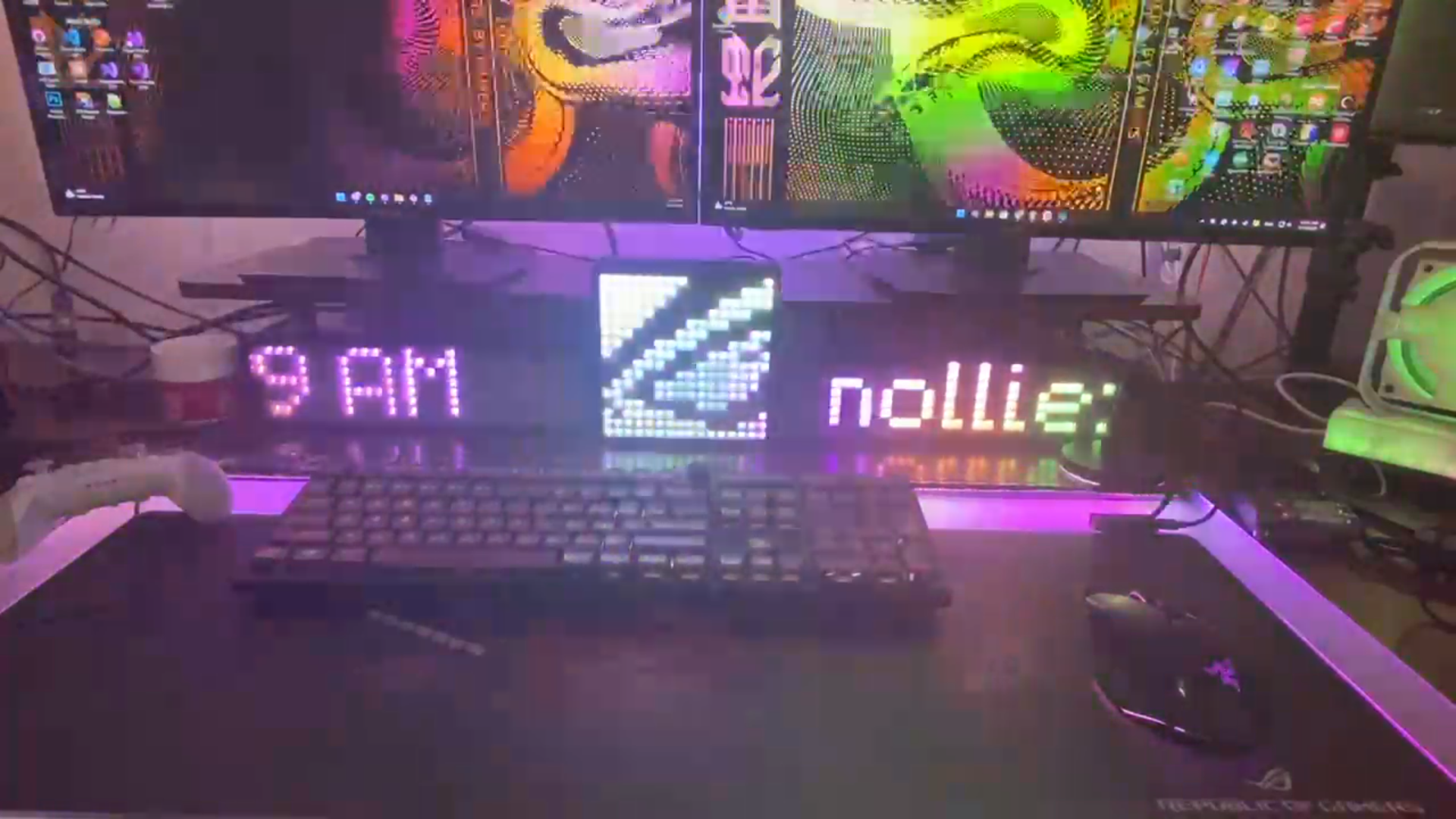
Display Mode: Time
Supported formats:
| Format | Description | Example |
| d | date | 1 |
| dd | date with leading zero | 01 |
| M | month | 3 |
| MM | month with leading zero | 03 |
| yy | 2-digits year | 24 |
| yyyy | full year | 2024 |
| h | 12-hour | 8 |
| hh | 12-hour with leading zero | 08 |
| H | 24-hour | 20 |
| HH | 24-hour with leading zero | 20 |
| m | minute | 5 |
| mm | minute with leading zero | 05 |
| s | second | 3 |
| ss | second with leading zero | 03 |
| t | a/p | p |
| tt | am/pm | pm |
Examples
- hh:mm:ss tt - 01:55:26 PM
- HH:mm:ss - 13:55:26
- dd.MM.yyyy - 15.04.2026
Display Mode: Pixel Art
Pixel Art is an Array of ones and zeroes in an Array, One represents light on and Zero represents light off.
Each group of Ones and Zeroes is equals to each row on your Matrix.
For example: Dino on my 16x16 Matrix
[
[0, 0, 0, 0, 0, 0, 0, 0, 0, 1, 1, 1, 1, 1, 1, 0],
[0, 0, 0, 0, 0, 0, 0, 0, 1, 1, 0, 1, 1, 1, 1, 1],
[0, 0, 0, 0, 0, 0, 0, 0, 1, 1, 1, 1, 1, 1, 1, 1],
[0, 0, 0, 0, 0, 0, 0, 0, 1, 1, 1, 1, 1, 1, 1, 1],
[0, 0, 0, 0, 0, 0, 0, 0, 1, 1, 1, 1, 1, 0, 0, 0],
[0, 0, 0, 0, 0, 0, 0, 0, 1, 1, 1, 1, 1, 0, 0, 0],
[1, 0, 0, 0, 0, 0, 0, 1, 1, 1, 1, 1, 1, 1, 1, 0],
[1, 1, 0, 0, 0, 0, 1, 1, 1, 1, 1, 1, 0, 0, 0, 0],
[1, 1, 1, 0, 0, 1, 1, 1, 1, 1, 1, 1, 0, 0, 0, 0],
[0, 1, 1, 1, 1, 1, 1, 1, 1, 1, 1, 1, 1, 1, 0, 0],
[0, 0, 1, 1, 1, 1, 1, 1, 1, 1, 1, 1, 0, 1, 0, 0],
[0, 0, 0, 1, 1, 1, 1, 1, 1, 1, 1, 0, 0, 0, 0, 0],
[0, 0, 0, 0, 1, 1, 1, 0, 1, 1, 0, 0, 0, 0, 0, 0],
[0, 0, 0, 0, 1, 1, 0, 0, 0, 1, 0, 0, 0, 0, 0, 0],
[0, 0, 0, 0, 1, 0, 0, 0, 0, 1, 1, 0, 0, 0, 0, 0],
[0, 0, 0, 0, 1, 1, 0, 0, 0, 0, 0, 0, 0, 0, 0, 0]
]
Another example: SignalRGB icon on my 16x16 Matrix
[
[1, 0, 0, 0, 0, 0, 0, 0, 0, 0, 0, 0, 0, 0, 0, 1],
[0, 0, 1, 1, 1, 1, 1, 1, 1, 1, 0, 0, 0, 0, 0, 0],
[0, 1, 1, 1, 1, 1, 1, 1, 1, 1, 0, 0, 0, 0, 0, 0],
[0, 1, 1, 1, 0, 0, 0, 0, 0, 0, 0, 0, 0, 1, 1, 0],
[0, 1, 1, 1, 1, 1, 1, 1, 1, 0, 0, 0, 1, 1, 0, 0],
[0, 1, 1, 1, 1, 1, 1, 1, 1, 1, 1, 0, 1, 0, 0, 0],
[0, 0, 0, 0, 0, 0, 0, 0, 1, 1, 1, 0, 0, 0, 0, 0],
[0, 0, 0, 0, 0, 0, 0, 0, 1, 1, 1, 0, 0, 1, 1, 0],
[0, 1, 1, 1, 1, 1, 1, 1, 1, 1, 1, 0, 1, 1, 0, 0],
[0, 1, 1, 1, 1, 1, 1, 1, 1, 1, 0, 1, 1, 0, 0, 0],
[0, 0, 0, 0, 0, 0, 0, 0, 0, 0, 1, 1, 0, 0, 0, 0],
[0, 0, 0, 0, 0, 1, 1, 0, 0, 1, 1, 0, 0, 1, 1, 0],
[0, 0, 0, 0, 1, 1, 0, 0, 1, 1, 0, 0, 1, 1, 0, 0],
[0, 0, 0, 1, 1, 0, 0, 1, 1, 0, 0, 1, 1, 0, 0, 0],
[0, 0, 0, 1, 0, 0, 0, 1, 0, 0, 0, 1, 0, 0, 0, 0],
[1, 0, 0, 0, 0, 0, 0, 0, 0, 0, 0, 0, 0, 0, 0, 1]
]
I made a simple html page to create pixel art: https://pixelart.nolliergb.com/
Display Mode: Libre Hardware Monitor
Requires Libre Hardware Monitor and with Remote Web Server running.
Supported formats:
| Format | Description | Example |
| cpu_load | CPU Usage | 20.0 % |
| cpu_temp | CPU Temperature | 35 °C |
| mb_fan1-10 | Motherboard Fans (Supports 1-10) | 1899 RPM |
| ram_load | RAM Usage | 30.1 % |
| ram_used | Used RAM | 12.10 GB |
| gpu_load | GPU Usage | 1.2 % |
| gpu_temp | GPU Temperature | 30° C |
| gpu_fan1-2 | GPU Fans (Supports 1-2) | 3000 RPM |
| gpu_mem_load | GPU VRAM Usage | 95.0 % |
| gpu_mem_used | Used VRAM | 6 GB |
Install

Prerequisites
Details
Comments 0
No comments yet. Be the first!
Add a YouTube video
Made a showcase or tutorial for this mod? Send the link. It appears in the gallery once it has been approved.
Log in to suggest a video.
Log in