SpotiSync
Play the same Spotify music in every room, in sync, from one Spotify account.
Description
SpotiSync
Play the same Spotify music in every room, in sync, from one Spotify account.
SpotiSync runs on one Windows PC (the host). It plays Spotify through Spotify Soloist, Spotify's official headless player, and streams that audio to a web player that every other room opens in a browser. All rooms hear the same song at the same moment, and play/pause, skip, seek and volume work from any room.
Spotify only ever sees one device, so one account is enough.
How it works
 Spotify ──► Soloist ──► SpotiSync (host PC) ──► http://<host-ip>:8383 ──► browsers in each room
             (plays)     captures Soloist's       web server: audio,         play in sync
                         audio, controls it       now playing, controls
- SpotiSync starts Soloist and controls it through Soloist's local WebSocket API.
- It captures only Soloist's audio (not other apps), timestamps it, and streams it to every browser.
- Each browser syncs its clock with the host and plays every piece of audio at the same moment as the other rooms, after a short shared buffer (800 ms by default).
Requirements
Host PC
- Windows 10 version 2004 or later, or Windows 11 (64-bit)
- Spotify Soloist for Windows, and a Soloist API key. Setting Soloist up needs Spotify Premium.
Each room
- Any device on the same home network with a modern browser and speakers. Chrome or Edge recommended.
Installation
- Download the latest
SpotiSync-<version>-setup.exefrom Releases and run it.- Keep "Let the other rooms connect" ticked. It adds a Windows Firewall rule so other PCs can reach SpotiSync.
- Prefer no installer? Download the
.zipinstead and runSpotiSync.exefrom it.
- Get Spotify Soloist and an API key from Spotify for Developers. SpotiSync doesn't include Soloist: Spotify asks that its builds aren't redistributed, so everyone downloads their own.
Windows may show a SmartScreen "unknown publisher" warning because SpotiSync isn't code-signed. Choose More info → Run anyway.
First-time setup
- Open SpotiSync.
- Under Spotify Soloist, choose your
soloist.exe, give the device a name (e.g.SpotiSync), and paste your API key. - Press Start.
- Pair once: open Spotify on your phone or PC, tap the devices icon, and select the device name you chose. Soloist remembers this from then on.
- In each room, open the address shown in SpotiSync (e.g.
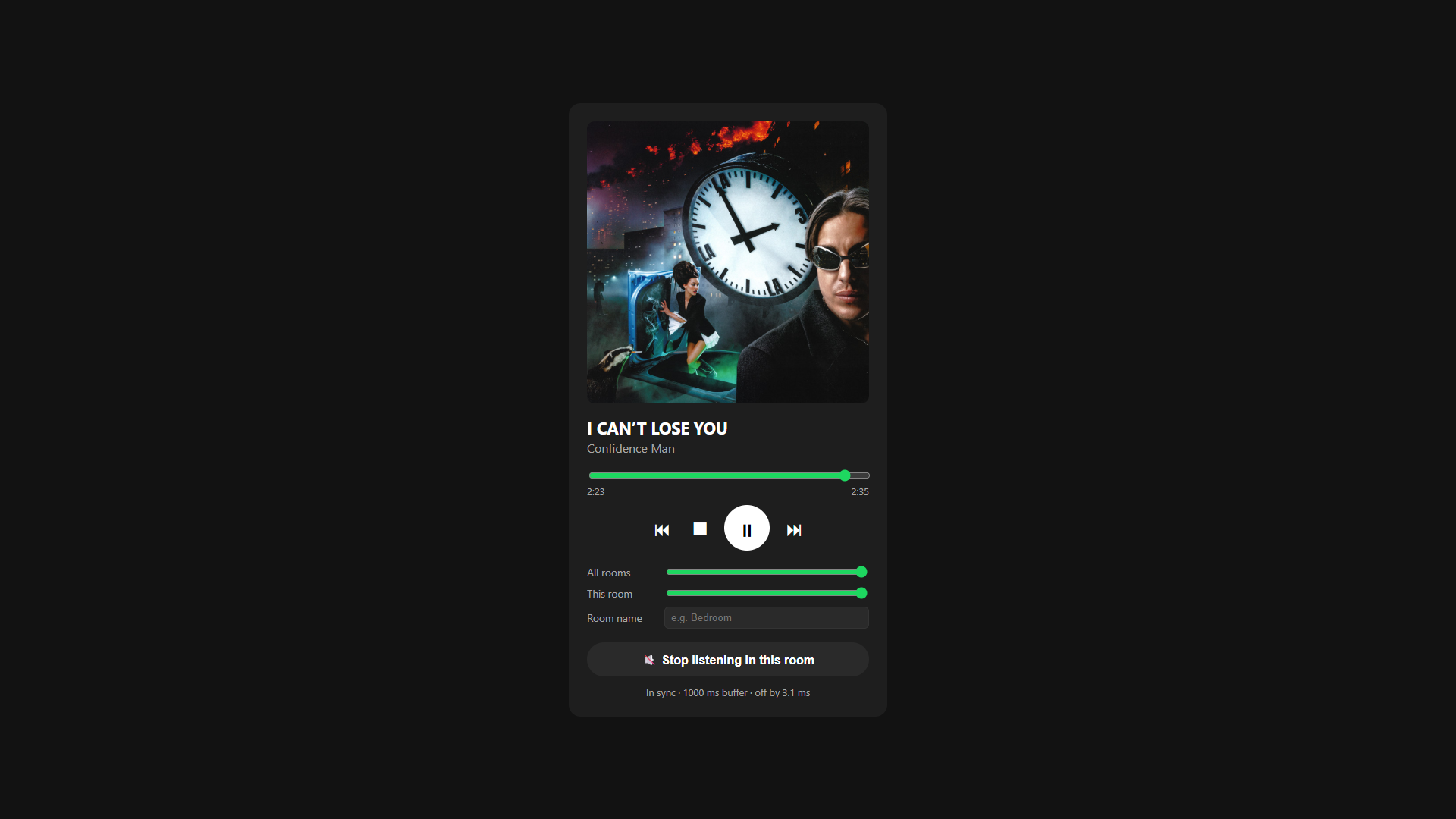
http://192.168.0.118:8383), give the room a name, and tap Listen in this room.
From then on, opening SpotiSync starts Soloist, switches Spotify playback to it, and starts playing automatically. You can turn both off in the settings.
Using it
Web player (in each room)
- Play/pause, stop, previous/next, and a seek bar. These control the music in every room.
- All rooms: Spotify volume for every room.
- This room: volume for this room only.
- Listen in this room: browsers only allow sound after a tap. Rooms that don't tap it get the controls without audio.
You can still control the music from the Spotify app too. SpotiSync shows up there as a normal Spotify Connect device.
Settings (on the host)
| Setting | What it does |
|---|---|
| Switch Spotify to SpotiSync and play on start | When Soloist starts, move playback from your phone/PC to SpotiSync and press play. |
| Mute Soloist on this PC | Keeps the host PC silent while the rooms still hear everything. To also listen on the host, open the web player there. |
| Start Soloist automatically when SpotiSync opens | No need to press Start each time. |
| Capture | Soloist app only (recommended), or everything playing on a chosen output device. |
| Room buffer (ms) | How far behind the host the rooms play. Raise it if audio drops out on weak Wi-Fi. |
| Port | Web player port (default 8383). |
Settings are stored in %APPDATA%\SpotiSync\config.json. Your API key is encrypted for your Windows user.
Troubleshooting
Other rooms can't open the web player
- Make sure your home network is set to Private in Windows (Settings → Network & internet). The installer's firewall rule doesn't cover Public networks.
- Use the address SpotiSync shows. Addresses from VPN adapters (e.g. Radmin, ZeroTier) won't work from other rooms.
Spotify doesn't switch to SpotiSync
- The first time, Soloist has to be paired: select the device in the Spotify app.
- If nothing has played on your account recently, start something in the Spotify app once.
Soloist stops with "this build has expired"
- Soloist builds last 90 days. Download a new build from Spotify for Developers and point SpotiSync at it.
Audio cuts out in one room
- Check the status line under the player. If "late" keeps going up, that room's connection is too slow for the buffer: raise Room buffer (ms) on the host.
Don't mute soloist.exe in the Windows volume mixer yourself. The rooms would hear silence. Use Mute Soloist on this PC instead.
Building from source
Requires the .NET 10 SDK on Windows.
dotnet build SpotiSync/SpotiSync.vbproj
Self-contained single-file build, as used for releases:
dotnet publish SpotiSync/SpotiSync.vbproj -c Release -r win-x64 --self-contained true \
  -p:PublishSingleFile=true -p:IncludeNativeLibrariesForSelfExtract=true \
  -p:EnableCompressionInSingleFile=true -p:DebugType=none --output publish
The installer is built with Inno Setup from installer/SpotiSync.iss.
Releases: the Build workflow runs when a GitHub release is published (the tag, e.g. v1.2.0, sets the version) and attaches the zip and installer to it. It can also be started manually from the Actions tab.
Project layout
| Path | Contents |
|---|---|
SpotiSync/frmMain.vb |
Host window: starts Soloist, settings, takeover, muting |
SpotiSync/SoloistClient.vb |
Soloist WebSocket API client |
SpotiSync/SoloistLauncher.vb |
Starts soloist.exe and finds its API port |
SpotiSync/AudioCapture.vb |
Captures Soloist's audio (WASAPI process loopback) |
SpotiSync/WebHub.vb |
Web server: page, audio stream, clock sync, commands |
SpotiSync/web/index.html |
The web player each room opens |
Notes
- SpotiSync is not affiliated with or endorsed by Spotify. Spotify and Spotify Soloist are trademarks of Spotify AB.
- It's intended for personal use on your own home network. Use of Soloist is subject to Spotify's terms.
- The web player has no login: anyone on your network who opens the address can control playback.
License
MIT © 2026 Bartholomew Ho
Prerequisites
Releases & Changelogs 1
Download (2 files)
No changelog provided in this release.
Details
- Category
- Tools
- Latest version
- 1.0.0
- Total downloads
- 0
- Page views
- 2
- First released
- November 2, 2026
- Last updated
- November 19, 2026
Comments 0
No comments yet. Be the first!
Add a YouTube video
Made a showcase or tutorial for this mod? Send the link. It appears in the gallery once it has been approved.


