Nitro System
Fast & Furious style nitro for Forza Horizon 2 (Xbox One build on PC via the Azimuth launcher), built on the FH2 Mod Platform.
Description
Nitro System for FH2
English | 中文
Fast & Furious style NOS for Forza Horizon 2 (Xbox One build on PC via the Azimuth launcher), built on the FH2 Mod Platform.
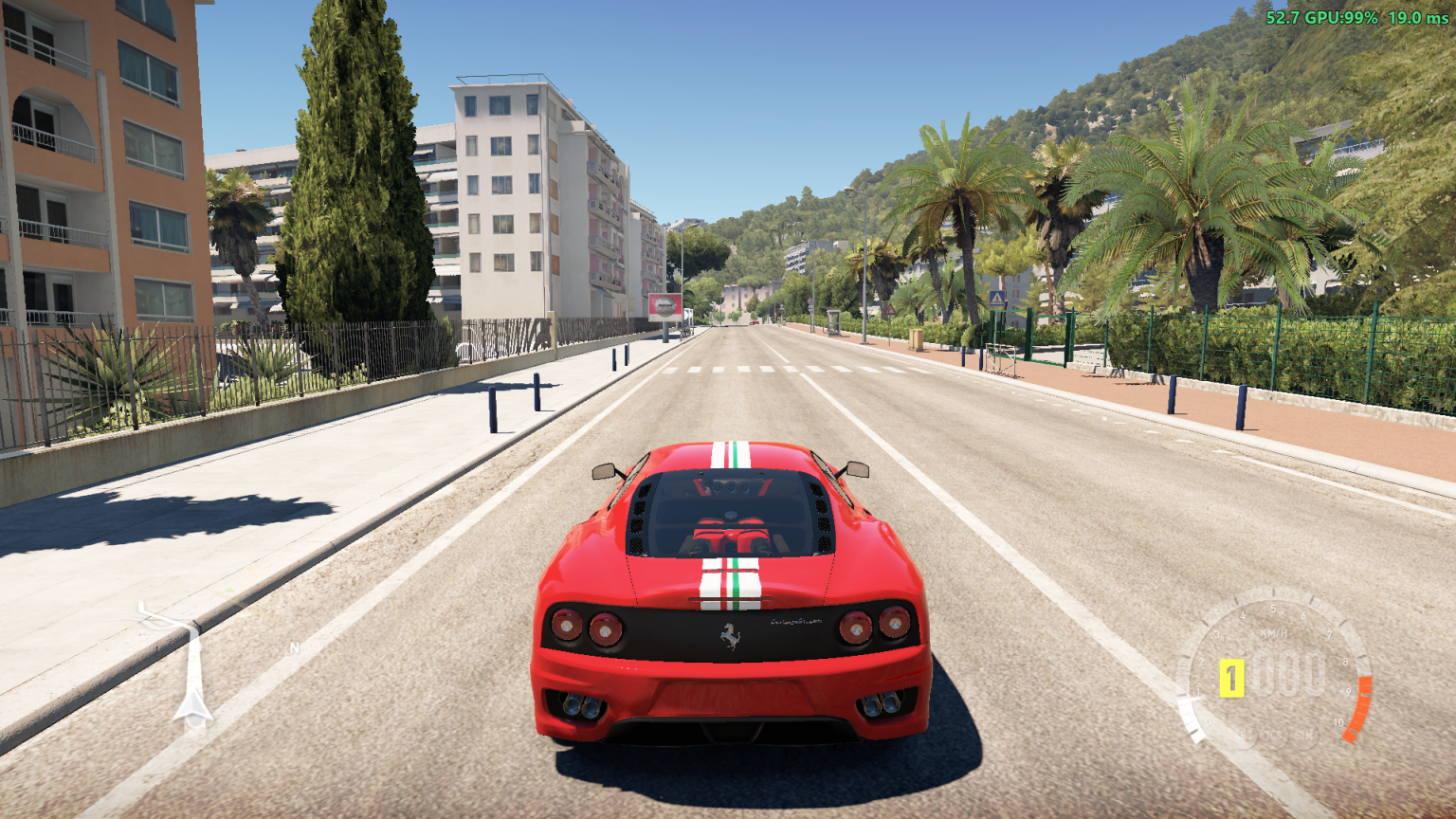
Buy a NOS Kit for your car in the garage, then hold LB (or any button you pick) to burn NOS: your car gets a strong push, blue flames shoot from your tailpipes, the speedometer gets a draining NOS gauge with a glowing tip, the screen edges glow blue with speed lines flying past, the NOS roars, the camera shakes and the controller rumbles.
Features
NOS on LB, or any button you choose. Hold the left shoulder button on any connected controller, or remap it to another button, d-pad direction or trigger (see NOS Button below). There is no keyboard key.
A real tank. NOS drains while you hold the NOS button and recharges when you let go. Run it dry and it locks out until you release the button and have recharged about 2 seconds.
Buildup curve. The push ramps up over a short time instead of snapping on.
Stays on the road. The push follows the horizontal direction of the car's nose, so a pitched-up nose doesn't launch you into the sky, and nothing is applied while the car is airborne (or for a moment after landing).
Only while driving. NOS only works while the game is simulating your car and the speedometer HUD is running, so it stays off in the pause menu, the map and loading screens. The tank doesn't drain or recharge while the game is paused. (Garage and car meet lobbies should also stay off, since the speedometer isn't active there.)
NOS Kit garage upgrade. NOS is a part you buy per owned car: Garage > Upgrades > Custom upgrade > Engine > NOS Kit. The stage sets the size of the tank and how fast it recharges; the push is the same for every stage (NOS Boost Multiplier). A car without the kit has no NOS, and its NOS gauge frame is hidden. Turn off Require NOS Kit to give every car NOS again, with the NOS Tank Capacity and NOS Recharge Rate settings. (From NitroSystem II.)
Stage Tank Recharge Price Stock no NOS free Stage 1 NOS 5 s 0.20 s per second 3 000 CR Stage 2 NOS 10 s 0.25 s per second 6 000 CR Stage 3 NOS 20 s 0.30 s per second 12 000 CR Stage 4 NOS 30 s 0.40 s per second 24 000 CR Drivatars (with Drivatar NOS on) get the same tank and recharge of the kit on the car you're driving, and no NOS while your car has no kit.
Screen effects. While NOS burns the field of view widens, a pulsing blue vignette glows at the screen edges and blue speed lines fly out from the middle, faster the faster you go. Each can be turned off. (From NitroSystem II.)
NOS gauge on the speedometer. Both the analog and the digital speedometers get a four-segment NOS bar that drains as you use NOS, with a glowing tip that follows the leading edge of the fill.
Exhaust flames. Blue flames come out of your car's real tailpipes while NOS is held, from the first second (the mod drives the game's own backfire effect, at the exhaust positions the car's own model gives).
Sound, rumble and camera shake. A boost sound that kicks in and then holds for as long as the tank lasts, and a stop sound, both played by the game's own audio from your car (fly a drone away and they fade with distance) (built into the DLL; put your own
nos_boost.wavandnos_stop.wavin anFnFNitrofolder next toazimuth.exeto replace them; your own boost sound loops from its start), a rumble that ramps up with the boost, and a camera shake while it burns. Each has its own setting below.In-game settings. Everything below is on the mod's page (Pause > MODS > YOUR MODS > NitroSystem, or Pause > Settings > MODS). It and the NOS Kit's names in the garage are in the game's language: Brazilian Portuguese, Dutch, French, German, Italian, Japanese, Korean, Polish, Russian, Spanish (Spain and Mexico) and Traditional Chinese. Czech and Hungarian stay English, as the game's own text does there. The text follows the game's language as soon as the game has picked it, and when you change it (the translations are the FH2 Mod Platform's, from 2.9.0; see Translating below).
Works alongside car mods. The Knight Rider car and other mods that patch the speedometer or the car's kind run alongside it, and cars listed in
DisabledCars(the Knight Rider car by default) get no NOS and no NOS gauge, so their own mod has the button. With ANNA Drone Mode installed, NOS is off while the drone flies. Other mods can switch NOS off too (see For mod authors below).
In-game settings
| Setting | Range | Default | What it does |
|---|---|---|---|
| Nitro System | On / Off | On | Turns NOS on or off (the mod's name stays Nitro System). Off also hides the NOS gauge. |
| NOS Button | LB, RB, A, B, X, Y, LS Click, RS Click, D-Pad, Back, Start, LT, RT | LB | Which button burns NOS. Applies right away. |
| NOS Debug Overlay | On / Off | Off | Draws debug info over the game (see below). |
| HUD Theme | Original / Fast & Furious | Fast & Furious | Original is the Forza Horizon 2 HUD with a yellow NOS bar. Fast & Furious has a cyan NOS bar, cyan gears and cyan ABS / TCS / STM icons. Needs a game restart. |
| Require NOS Kit | On / Off | On | On: only cars with the NOS Kit upgrade have NOS, and the kit's stage sets the tank and its recharge. Off: every car has NOS, with the NOS Tank Capacity and NOS Recharge Rate, and the NOS Kit isn't in the garage. Which cars have NOS changes right away; the NOS Kit's garage entry comes or goes after a game restart. The stage each car had is kept meanwhile. |
| Hide NOS Gauge Without Kit | On / Off | On | Hides the NOS gauge frame on cars without the kit. Off leaves an empty frame. Applies right away. |
| NOS Boost Multiplier | 1.0x - 2.0x | 1.6x | Strength of the push, for every kit stage and for Drivatars. |
| NOS Tank Capacity (sec) | 5 - 60 | 20 | Seconds of NOS in a full tank. Ignored while Require NOS Kit is on: then the kit's stage sets the tank. |
| NOS Buildup Time (sec) | 0.1 - 2.0 | 0.5 | How long the push takes to ramp up. |
| NOS Recharge Rate | 0.0 - 1.0 | 0.2 | Seconds of NOS restored per second while not boosting. Ignored while Require NOS Kit is on: then the kit's stage sets the recharge. |
| NOS Sound Volume | 0 - 100 | 50 | Volume of the boost and stop sounds. The game's own volume sliders don't change them. Applies from the next boost. |
| NOS Camera Shake | 0 - 100 | 65 | How much the camera shakes while NOS burns, in the driver, hood, bumper and chase views. 0 turns it off. Applies right away. |
| NOS Wider FOV | 0 - 30 | 10 | How much wider (in %) the field of view gets while NOS burns, in the same views. 0 turns it off. Applies right away. |
| NOS Blue Vignette | On / Off | On | A pulsing blue vignette at the screen edges while NOS burns. Applies right away. |
| NOS Speed Lines | On / Off | On | Blue streaks flying out toward the screen edges while NOS burns, in step with the car's speed. Applies right away. |
| Backfire on All Cars | On / Off | On | Lets every car backfire, which the exhaust flames need (see below). Needs a game restart. |
| Refill NOS on Race Start | On / Off | On | Fills the tank when a race starts, you quit one, you change car or you fast travel. Applies right away. |
| Refund NOS on Rewind | On / Off | On | Rewinding gives back the NOS you used since the point you rewind to. Applies right away. |
| NOS Controller Rumble | On / Off | On | Rumbles the controller while NOS burns. The game's own rumble isn't affected. Applies right away. |
| Drivatar NOS | On / Off | Off | Drivatars use NOS too, whenever they can, at any speed: they let off only in the air, in a big slide or when the tank runs dry (then, like you, they wait for 2 s of NOS). They don't boost before the race starts: not while your HUD is down, and only once they've been rolling for 2 s off the grid. Once they're more than 100 m ahead of you they coast, so you can catch up; behind you they boost freely. Each has a tank of its own, with twice the tank and twice the recharge of the NOS Kit on the car you're driving (no NOS while it has no kit), and your boost and buildup. Their exhausts flame and the boost plays through the game's own audio at the car, so you hear it from where it is, fading out by 150 m. The nearest 6 are heard, at the Drivatar NOS Volume. Applies right away. |
| Drivatar NOS Volume | 0 - 100 | 25 | Volume of the Drivatars' NOS sound, heard from their cars. 0 silences it. Applies right away. |
Settings are saved to fh2-mods\FnFNitro.ini:
[Settings]
NitroEnabled=1
NitroButton=LB
TorqueScale=1.60
Duration=20.0
BuildupTime=0.50
RechargeRate=0.20
SoundVolume=0.50
DrivatarSoundVolume=0.25
CameraShake=0.65
DebugOverlay=0
BackfireOnAllCars=1
RefillOnRaceStart=1
RefundOnRewind=1
DrivatarNitro=0
Rumble=1
HudTheme=FF
DisabledCars=3884
RequireNitrousKit=1
HudHide=1
FovBoost=0.10
VignetteEnabled=1
SpeedLinesEnabled=1

[Upgrade]
Area=1
Price1=3000
Tank1=5
Price2=6000
Tank2=10
Price3=12000
Tank3=20
Price4=24000
Tank4=30
Recharge1=0.20
Recharge2=0.25
Recharge3=0.30
Recharge4=0.40
The NOS Kit fitted to each car you own is kept beside the game's saves, in data\titles\1A96545B\FnFNitro\player-1\FnFNitroGarage.json (the player-N of the save written last), and written when you install a stage. It's outside the saves folder on purpose: Azimuth checks the hashes of what's in there, so a file of the mod's own could make a save look damaged. Back up the 1A96545B folder and the file comes along with your saves.
{
  "version": 1,
  "cars": [
    { "garageId": 32, "carOrdinal": 2183, "stage": 3 },
    { "garageId": 45, "carOrdinal": 2183, "stage": 0 }
  ]
}
garageId is the game's id of one car you own, so two copies of the same model (carOrdinal) each have their own stage: here one has Stage 3 and the other no NOS. stage is 0 (none) to 4. If the game gives a sold car's garageId to a different model, that entry starts again from 0. You can edit the file while the game is closed. Older versions kept this in the ini as [GarageNitro] and [GarageCar], or in fh2-mods\FnFNitroGarage.json; those are moved into the file the first time this version starts.
A few notes on the file:
HudThemeisFF(Fast & Furious, the default) orOriginal. The mod writes the HUD files when it starts and when you change the setting, and the game reads them the next time it starts.NitroButtonpicks which controller button burns NOS (defaultLB). An unknown value falls back toLB. In the ini you write the name:# Name Button # Name Button 1 LBLeft bumper 9 DPadUpD-pad up 2 RBRight bumper 10 DPadDownD-pad down 3 AA 11 DPadLeftD-pad left 4 BB 12 DPadRightD-pad right 5 XX 13 BackBack / View 6 YY 14 StartStart / Menu 7 LSLeft stick click 15 LTLeft trigger 8 RSRight stick click 16 RTRight trigger Pick one the game doesn't already use while driving, or it will do both at once. Changes on the Mods page apply immediately; edits to the file apply the next time the game starts.
With a platform older than 2.8.0 the Mods page can't show names, so NOS Button is a slider with the numbers above and HUD Theme is a slider where 1 is Original and 2 is Fast & Furious.
[Upgrade]sets the NOS Kit:Price1..Price4in CR,Tank1..Tank4(seconds of NOS, 1 to 600) andRecharge1..Recharge4(seconds of NOS restored per second, 0.00 to 5.00) for the four stages, andArea, the upgrade area the entry is listed under (1 = Engine). The prices, tanks, recharge rates and names are read at startup, so changes apply the next time the game starts. (Boost1..Boost3from an earlier version are removed: the push is the NOS Boost Multiplier for every stage.) Which stage each car has is kept inFnFNitroGarage.json(above).DisabledCarslists cars that get no NOS, no NOS gauge and no NOS Kit in the garage, by the game's car id (Data_Car.Id), separated by commas:3884is the Knight Rider car, whose own mod uses LB. Leave it empty to let every car have NOS. The platform log showsYour car: id ...each time you change car, which is how to find a car's id. There is no Mods page row for it.BackfireOnAllCarsis the Backfire on All Cars row on the Mods page. When it is on, the mod makes every car able to backfire by changing the game database at startup, which the flames depend on. Turn it off to leave the game's own backfire settings alone: flames then only work on cars the game already lets backfire. A change only takes effect the next time the game starts.
Debug overlay
Switch on NOS Debug Overlay to draw a small panel in the top-left corner of the game window: NOS state and fuel, the NOS Kit stage and garage id of the car you're driving, whether the mod thinks you are driving, whether your car has been found (by the game's own car kinds, or by position until those are known), how many Drivatars are boosting, the exhaust tips, and the flame counters. It is a transparent window laid over the game, like the FPS counter, so the game must run in borderless or windowed mode.
Requirements
- Azimuth launcher with Forza Horizon 2.
- The FH2 Mod Platform 2.9.0 or newer (
DWrite.dllin the Azimuth folder), which the release zip includes. The other mods you may already have, such as ShowFPS or Achievements, use the same one. On 2.8.0 the mod still works, but its text is English only; older than 2.8.0, the NOS Kit isn't added to the garage and every car has NOS instead. - Forza Horizon 2 Extra Options is optional. The NOS gauge and HUD textures, the blue flame effect, the upgrade icons and the database changes (the NOS Kit, and "every car can backfire") go to the game's
mediaoverridefolder; platform 2.7.3 and newer makes the game read that folder by itself, and with Extra Options installed it uses Extra Options' (keep itsEnableMediaOverrideson).
Installation
The paths below are examples. Use your own Azimuth folder and the game's Mount folder.
From a release (easiest)
- Download
FnFNitro-<version>.zipfrom the Releases page and unzip it. - Close the game. Copy the zip's **
azimuth-windows\** folder into your Azimuth folder (the one withazimuth.exe). Say yes to merging. - Start the game through Azimuth.
The zip contains the mod (FnFNitro.dll, with the HUD files, flame effect, upgrade icons and NOS sounds inside it), the FH2 Mod Platform (DWrite.dll, which loads mods; if you already have a newer one from another mod, keep yours), the licences, and an INSTALL.txt with these same steps.
[!IMPORTANT]
FnFNitro.dllgoes infh2-mods, the FH2 Mod Platform's folder. It is not an Extra Options mod: don't put it in Extra Options'modsfolder, where it won't be loaded. Iffh2-modsdoesn't exist yet, the zip creates it.
Upgrading from 1.2 or older: those versions had you copy the HUD textures and flame files into Mount\mediaoverride. They are inside the DLL now, so you don't need to copy Mount\ any more. The first time the new version starts it deletes the old copies it recognises (only files that match the old release byte for byte, so anything you changed is left alone) and writes Removed N old HUD/flame file(s) to platform.log. Leftover .bak files next to them are the platform's backups of what was there before; you can delete those yourself.
From the source tree
The dist\ folder in this repository mirrors where each file goes:
| From | To |
|---|---|
dist\fh2-mods\FnFNitro.dll |
D:\Games\FH2\azimuth-windows\fh2-mods\ |
DWrite.dll from the platform's releases page |
D:\Games\FH2\azimuth-windows\ (only if the platform isn't installed yet) |
Start the game through Azimuth. Open fh2-mods\platform.log and look for lines like loaded FnFNitro.dll and nitrous upgrade active, and later Player car located and Vertical axis learned, which mean the mod found your car.
Building from Source
Requires Visual Studio 2022 (MSVC C++20) and CMake 3.20+.
# Configure
cmake -B build -A x64

# Build Release
cmake --build build --config Release

# Package into dist\ and copy everything into your Azimuth and game folders
powershell -ExecutionPolicy Bypass -File scripts\package.ps1 -AzimuthDir "D:\Games\FH2\azimuth-windows"
The platform DLL is not built with MSVC: the platform needs llvm-mingw. The release workflow cross-compiles it from the platform\ submodule and ships it as DWrite.dll (the name Azimuth 1.0.1 and later load). To update it, move the submodule to the new tag.
Local deploy script
package.ps1 builds, fills dist\, and deploys the DLL. The -AzimuthDir parameter defaults to the author's folder (D:\Games\FH2\azimuth-windows), so pass your own unless yours matches. If the game is running it can't overwrite the DLL, so close the game and run the script again.
Uninstalling
Close the game first. Don't remove anything else from mediaoverride: the Mods page screens, string tables, car zips and DefaultCache.bin there belong to the FH2 Mod Platform and your other mods, and DWrite.dll is the platform itself.
To switch the mod off without uninstalling it, open Pause > Settings > MODS and turn Nitro System off (or set NitroEnabled=0 in the ini).
1. Delete the mod (Azimuth folder)
Delete these from azimuth-windows:
fh2-mods\FnFNitro.dllfh2-mods\FnFNitro.ini(your saved settings)data\titles\1A96545B\FnFNitro\(the NOS Kit fitted to each of your cars)- the
FnFNitro\folder, if you made one to use your own sounds
2. Start the game once
Launch the game through Azimuth. The mod's HUD, flame and database files in Mount\mediaoverride are handed out by the FH2 Mod Platform, and it deletes them shortly after startup once no installed mod uses them: the NOS speedometer (UI\Controls\HUDSpeedometerControl.xaml and the textures under UI\textures\Anthem\HUD\Speedometer\, UI\textures\data_bound\Anthem\HUD\ and UI\textures\data_bound\SpireHUD\), the flame effect (Particles\Systems\Backfire.xml), the NOS Kit's upgrade icons (UI\textures\data_bound\Upgrade_Parts\Custom\) and the database copy with the NOS Kit and "every car can backfire" (stripped\gamedbRC.slt, which is only made again if another mod still changes the database). The speedometer, flames, car backfires and the garage's upgrade list are then back to stock. Open fh2-mods\platform.log: there should be no [NitroSystem] lines.
3. Only if you installed 1.2 or older by hand
Those versions had you copy files into Mount\mediaoverride yourself. 1.3 and later delete the copies they recognise when they start, so this only matters if you never ran a newer version. Delete these if they're still there (add -WhatIf to see what would go without deleting anything):
$mo = "D:\Games\FH2\Anthem_1.0.0.64_x64__8wekyb3d8bbwe\Mount\mediaoverride"

$targets = @(
  "$mo\UI\textures\Anthem\HUD\HUD_XPBar_TipGlow.swatchbin",
  "$mo\UI\textures\Anthem\HUD\SkillBarTipGlow.swatchbin",
  "$mo\UI\textures\Anthem\HUD\SkillsLargeGlow.swatchbin",
  "$mo\UI\textures\Anthem\HUD\Speedometer",
  "$mo\UI\textures\data_bound\SpireHUD",
  "$mo\UI\textures\data_bound\SpireHUD.zip",
  "$mo\Particles\Materials\backfire.materialbin",
  "$mo\Particles\Materials\backfire_blue.materialbin",
  "$mo\Particles\Materials\backfire_purple.materialbin",
  "$mo\Particles\Materials\Fire\backfire_blue.materialbin",
  "$mo\Particles\Materials\Fire\carBackfire.materialbin",
  "$mo\Particles\Shaders\backfire"
)
foreach ($t in $targets) {
  if (Test-Path $t) { Remove-Item $t -Recurse -Force } else { "Not found (already gone): $t" }
}
Known limitations
- Buying a kit is recorded in your save. Which stage is fitted to each car is kept in the mod's own file, but the purchase goes through the game's own upgrade shop, which records it in your save like any other part (in its list of bought parts, under part type 47). So the game remembers the stages you've bought: switching a car back to a stage it already owns is free, and the price paid gets the game's usual discount. After uninstalling the mod those entries stay in the save, pointing at upgrade rows that are gone with the mod; how the game treats them then hasn't been tested, so back up your saves before uninstalling.
- One file per player, picked at startup. The mod uses the
saves\player-Nfolder written last; switching players during a session is only noticed at the next launch. - Stage 4 shows Stage 3's icon. There's no picture of its own for it yet (
icons\stage4.png). [Upgrade]changes need a restart. The stages and their descriptions ("NOS, stage 3: 20 s tank, recharges 0.30 s per second.") are made at startup.
Troubleshooting
Everything the mod says goes to fh2-mods\platform.log (starts fresh every launch). Useful lines:
loaded FnFNitro.dll, then[NitroSystem]lines for each hook it installed: the mod is running.Player car locatedandVertical axis learned: Y: the mod found your car and which way is up. This takes a few seconds of driving after the game loads. Until it has found your car, the mod can't tell your car from AI cars and may push every simulated car, so give it a few seconds before you use NOS next to other cars.Camera view matrices hookedandCamera field of view hooked: the camera shake and the wider FOV are in place.nitrous upgrade active: Garage > Upgrades > Custom upgrade > Engine > Nitrous Kit: the NOS Kit is in the garage.NOS Kit of each car: ...gives the path of the garage file, andNOS Kit stage on the driven car: 3 (20 s tank, recharges 0.30 s/s)appears when you get in a car.The NOS Kit upgrade could not be set uporthe nitrous upgrade is not active: the kit couldn't be added (platform older than 2.8.0, or a game build it doesn't know), so every car has NOS.Failed to ...orCould not hook ...: a hook didn't install, usually because the game build isn't the one this mod was written for.
If there is no NOS gauge or no flames, check that the platform is 2.7.3 or newer (or that Extra Options is installed with EnableMediaOverrides on), and that platform.log has [NitroSystem] replaces media\... lines for the HUD files and Backfire.xml. If it says the mod couldn't replace a file, another mod is already replacing it. If the gauge is there but empty with no frame, the car you're driving has no NOS Kit (or is in DisabledCars).
Translating
The mod's text (its page on the MODS tab and the NOS Kit in the garage) is translated with the FH2 Mod Platform's gettext workflow (platform/docs/translating.md):
l10n/NitroSystem.potlists every text, with its key, where it shows and how long it may be.l10n/has one PO file per language (de.po,pt_BR.po,zh_Hant.po...), built into the DLL assrc/nitro_l10n.inc.- To try a translation in game without a build, put it in
fh2-mods\lang\NitroSystem\<language>.po(ru.po, say) and start the game in that language: the platform uses it instead of the built-in one, andplatform.logsays so, and names any entry it left out.
After changing the English in the code or a PO file:
python platform/tools/l10n/extract.py --domain NitroSystem src            # l10n/NitroSystem.pot
python platform/tools/l10n/po2inc.py src/nitro_l10n.inc nitro_translations l10n/*.po
python scripts/check_fonts.py "<Mount>/media/ui/Fonts.zip"               # every letter in the game's fonts
A text whose English changed shows in English until its translation is updated, never with the old meaning. Corrections from native speakers are welcome as issues or pull requests: edit the language's PO file (Poedit reads and writes them).
For mod authors: switching NOS off
Full details, with a ready-to-copy lookup thread, are in docs/MOD_CONTROL.md. Another FH2 Mod Platform mod can switch the player's NOS off while it needs to, and read whether NOS is burning and how full the tank is. Copy include/NitroSystemControl.h into your mod and look the switch up once every mod has started:
#include "NitroSystemControl.h"

// from your own thread, not from fh2mod_init
api->wait_for_mods(10000);
const NitroSystemControl* nos =
    (const NitroSystemControl*)api->get_interface(NITROSYSTEM_CONTROL_NAME, NITROSYSTEM_CONTROL_VERSION);

if (nos) nos->set_blocked("MyMod", 1);   // NOS off for the player
if (nos) nos->set_blocked("MyMod", 0);   // and on again
set_blocked(who, on): each mod blocks under its own name, and NOS stays off while any mod blocks it, so two mods can't undo each other. While blocked, the NOS button does nothing, NOS that was burning stops at once and the NOS gauge is hidden; the tank still recharges, and Drivatars aren't affected. Blocks last until the game closes.is_blocked(),is_active()(NOS burning) andnitro_percent()(tank, 0 to 100).NULLfromget_interfacemeans Nitro System isn't installed: carry on without it.- Without the platform's interfaces,
FnFNitro.dllexports the same asFnFNitro_SetBlocked,FnFNitro_IsBlocked,FnFNitro_IsActiveandFnFNitro_GetNitroPercent.
platform.log says NOS blocked by MyMod. and NOS no longer blocked by MyMod., and the debug overlay lists the mods blocking it. ANNA Drone Mode needs none of this: Nitro System asks it whether the drone is flying (ANNA Drone Mode found in the log) and blocks NOS under its name.
Credits
- Levilente, for NitroSystem II, whose NOS Kit garage upgrade (
src/nu_upgrade.h,src/nu_sql.h), upgrade icons (icons/,scripts/gen_icons.py,scripts/icontools/), wider FOV, blue vignette and speed lines (hud/HUDSpeedometerControl.xaml,scripts/gen_speedlines.py) are used here under the MIT License. - NitroSystem II, this mod's Forza Horizon 3 port, which found that the car can be asked for its exhaust locators before its first backfire. FH2 does it the same way, which is how the flames start straight away.
- suderek22, for FH2_HonkHonk. It showed how to play sounds through the game's own FMOD audio engine at a position in the world, which is how the Drivatars' NOS sound is played from their cars. No HonkHonk code is used here: this mod calls the same FMOD functions with its own code.
- Deuquan, for FH2-CameraMods. It showed which camera functions build the driver, hood, bumper and chase cameras' view, which is where the NOS camera shake and wider FOV are applied.
Prerequisites
Releases & Changelogs 1
A fix-up release for 2.0.0: readable text in every language, better compatibility with the KITT (Knight Rider) mod, and a cleaner garage.
Fixed
- Garbled text in other languages (Russian showed as
Си..., and other languages could break too). The included FH2 Mod Platform 2.9.0 now hands every mod's text to the game in a form it always reads correctly. (#6, #7) - Lines on screen with the KITT mod installed. Blue NOS speed lines could appear in any car, even without NOS, because KITT and Nitro System used the same speedometer slot. Nitro System now leaves that slot to KITT, and its speed lines and blue vignette look the same as before.
- NOS Kit for sale on cars that can't use NOS. Cars in
DisabledCars(KITT by default) no longer show the NOS Kit under Garage > Upgrades > Custom upgrade > Engine. - NOS Kit for sale when it isn't needed. With Require NOS Kit off, every car already has NOS, so the NOS Kit is no longer added to the garage. The stages you bought are kept and come back when you turn the setting on again.
Changed
- Your language straight away. The mod's page and the NOS Kit's garage names follow the game's language as soon as the game picks it, and again whenever you change it. Before, they followed one launch later. Numbers are written your language's way (
0,30in German). - Require NOS Kit needs a restart for the garage part: the row is marked with
*and offers to restart the game. Which cars have NOS still changes right away. - Translations are now gettext PO files, built on the FH2 Mod Platform's translation system. Translators can try a fix without a new build: put the file in
fh2-mods\lang\NitroSystem\<language>.poand start the game. Corrections from native speakers are welcome.
Requirements
- FH2 Mod Platform 2.9.0 or newer, included in the zip. On 2.8.0 the mod works, but its text is English only.
- Forza Horizon 2 Extra Options is optional.
Upgrading from 2.0.0
Close the game, copy the zip's azimuth-windows\ folder into your Azimuth folder and merge. Your settings, and the NOS Kit fitted to each car, are kept. Make sure DWrite.dll (the platform) is 2.9.0 or newer: the first line of fh2-mods\platform.log says which one is running.
A note for KITT owners
If KITT's Pursuit Mode doesn't engage, that comes from the KITT mod itself: it happens with Nitro System removed too, while Super Pursuit Mode still works. Please report it to KITT's author with its KITT_LOG.txt.
Details
- Game / Software
- Forza Horizon 2
- Category
- Scripts
- Latest version
- 2.0.1
- Total downloads
- 0
- Page views
- 2
- First released
- October 20, 2026
- Last updated
- November 19, 2026
Comments 0
No comments yet. Be the first!
Add a YouTube video
Made a showcase or tutorial for this mod? Send the link. It appears in the gallery once it has been approved.
More in Forza Horizon 2