FH3 ANNA
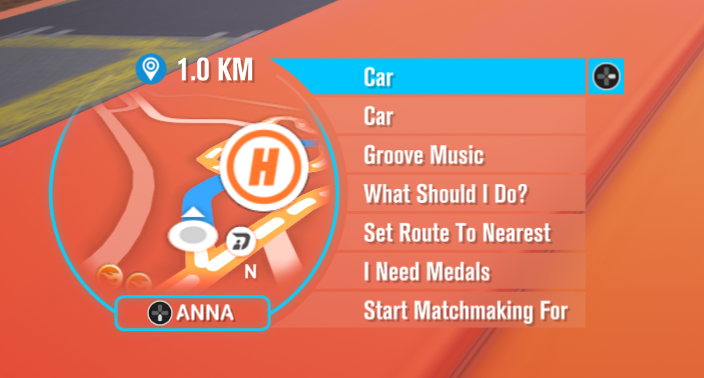
ANNA's menu for Forza Horizon 3 on Azimuth: press **D-pad Down** while driving.
Description
FH3 ANNA
ANNA's menu for Forza Horizon 3 on Azimuth: press D-pad Down while driving. ANNA is an
Extra Options plugin (an FH3 build newer than 0.6.0: older ones have ANNA built in, and then this plugin stays
out of the way), and any other mod can add its own entries to her menu.
For players
With Extra Options for FH3 installed, put ANNA.dll in mods\Forza Horizon 3\ANNA\plugins\ next toazimuth.exe. ANNA adds:
- Car (in ANNA's main list):
- Auto Drive: the game's AI drives your car along the route set on the map or by ANNA.
A key (F2) or controller chord (L3+R3) toggles it too; throttle, brake or steering hands the car
back. While ANNA drives, her ring around the minimap is lit with "Auto Drive On" above her, and LB
switches to slow orbiting cinematic shots behind black bars, and back. - Lights: headlights, hazard lights and left/right indicators.
- Doors: open and close the roof, hood, trunk and doors the car animates, or all at once. Parts
open only while stationary; the throttle closes them.
- Auto Drive: the game's AI drives your car along the route set on the map or by ANNA.
- ANNA in races: the game turns ANNA off in races; D-pad Down still opens her list there.
- Indicators on the D-pad: hold D-pad Left/Right for a second to switch that indicator (a tap still
changes the radio station). Indicators turn off once a turn is made and the steering is centred.
Settings are in mods\Forza Horizon 3\ANNA\ANNA.ini. ANNA writes it on her first start, with the
values FH3_ExtraOptions.ini's [Vehicle] section had (those settings were part of Extra Options
before ANNA became a plugin). Her log lines are in FH3_ExtraOptions.log, marked PLUGIN:.
For mod developers
DOC.md has the full guide, and two examples to start from: an Extra Options plugin
(examples/extra-options-plugin) and an FH3 Mod Platform mod
(examples/mod-platform). In short:
Copy include/fh3anna.h into your mod. It is plain C and works from C and C++,
whatever loads your mod: an Extra Options plugin, an
FH3 Mod Platform mod in fh3-mods, or a DLL of
your own. ANNA.dll exports FH3ANNA_GetApi; the header's fh3anna_get finds it.
#include "fh3anna.h"

static void honk(void* user, const char* key) { /* on the game's thread */ }

static void add_my_entries(const FH3AnnaApi* anna) {
    FH3AnnaEntry list = {sizeof list};
    list.key   = "mymod";              /* a list of your own in ANNA's main list */
    list.label = "My Mod";
    anna->add_entry(&list);

    FH3AnnaEntry e = {sizeof e};
    e.key        = "mymod.honk";       /* unique: start it with your mod's name */
    e.parent     = "mymod";            /* or FH3ANNA_LIST_CAR for her Car list */
    e.label      = "Honk";
    e.on_choose  = honk;
    e.stays_open = 1;                  /* ANNA stays open; leave 0 to close her first */
    anna->add_entry(&e);
}
- An Extra Options plugin whose name comes after
ANNA(plugins load in name order) callsfh3anna_get(1)fromFH3PluginInitialize. - Anything that may start earlier (FH3 Mod Platform mods, a plugin a
loadorder.txtputs first)
callsfh3anna_wait(1, 60000)from a thread of its own; it returns once ANNA has loaded, or NULL
after the timeout when she isn't installed.
NULL from either means ANNA isn't installed (or is too old): carry on without her.
Entries without on_choose are lists: they show only while one of their entries shows, open inside
ANNA, and D-pad Left goes back up. shown hides an entry until it applies (Groove Music Radio's list
shows only while the radio plays the Groove station); label_now gives a label that changes
("Open Roof" / "Close Roof"). Labels are UTF-8; translate yours into the game's language yourself.
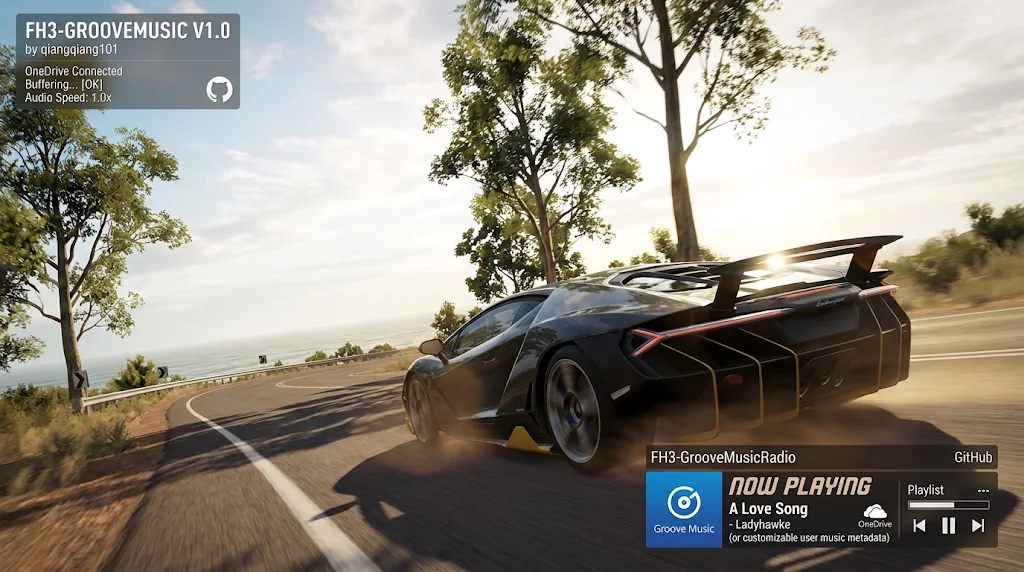
Every callback runs on the game's thread, so keep them short. Groove Music Radio
(FH3-GrooveMusic) is a complete example.
ANNA's own lists: car (Car), car.lights (Car > Lights), car.doors (Car > Doors).
Building
sh build.sh [out.dll] with llvm-mingw.sdk/fh3_plugin.h is a copy of Extra Options' plugin SDK (API version 2 or newer: Auto Drive's
cinematic camera hides the HUD with set_hud_hidden; with an older Extra Options the HUD stays).
Prerequisites
Releases & Changelogs 1
Download (2 files)
FH3 ANNA turns ANNA's menu (D-pad Down while driving) into a menu every Forza Horizon 3 mod can use. It also brings ANNA's car features with it: Auto Drive, lights and doors. These used to be part of Extra Options; they are now this plugin.
For players
Car (in ANNA's main list)
- Auto Drive. The game's AI drives your car along the route set on the map or by ANNA.
- Starting it: Enable Auto Drive in ANNA's Car list, F2 on the keyboard, or L3 + R3 on the controller.
- Stopping it: throttle, brake or steering hands the car back to you, or say so in ANNA's menu (Disable Auto Drive).
- While ANNA drives, her ring around the minimap lights up with Auto Drive On above her.
- Cinematic camera: press LB to switch to slow orbiting shots of the car behind black bars, with a wider view; press it again to switch back. A prompt at the bottom of the screen reminds you of both buttons.
- Lights: headlights, hazard lights, and left/right indicators.
- Doors: open and close the roof, hood, trunk and doors the car animates, or all of them at once. Parts open only while you're stopped, and the throttle closes them again.
Indicators on the D-pad
- Hold D-pad Left or Right for a second to switch that indicator on or off. A tap still changes the radio station.
- Indicators switch off by themselves once you've made the turn and straightened the wheel.
ANNA in races
- The game normally switches ANNA off in races. With FH3 ANNA, D-pad Down still opens her menu there.
- Her button shows D-pad Down instead of the crossed-out microphone.
Languages
ANNA's labels follow the game's language: English, German, French, Italian, Spanish (Spain and Mexico), Portuguese (Brazil), Dutch, Polish, Czech, Hungarian, Russian, Japanese, Korean, and Chinese (Simplified and Traditional).
For mod authors
- Add your mod to ANNA's menu with one header,
include/fh3anna.h, from an Extra Options plugin, an FH3 Mod Platform mod, or any DLL in the game. - What your entries can do:
- your own lists, nested inside each other;
- entries in ANNA's own Car, Lights and Doors lists;
- labels that change ("Open Roof" / "Close Roof");
- entries that only show when they apply;
- entries that keep ANNA open, for toggles and counters.
- DOC.md is the full guide.
- Two ready-to-build examples:
examples/extra-options-plugin(C) andexamples/mod-platform(C++). - Groove Music Radio is a real mod that uses it: it adds playlists and previous/next song while the Groove station plays.
Install
- Requires Extra Options for FH3, a version with plugin API 3. Older versions run ANNA without the letterbox, the button prompts, the lit ring and the race button.
- Next to
azimuth.exe, putANNA.dllinmods\Forza Horizon 3\ANNA\plugins\. - Start the game. ANNA writes her settings to
mods\Forza Horizon 3\ANNA\ANNA.ini.
Coming from an Extra Options version with Autodrive built in: on first start, ANNA copies your settings from FH3_ExtraOptions.ini's [Vehicle] section. After that you can delete [Vehicle].
Settings (ANNA.ini)
| Setting | Default | What it does |
|---|---|---|
[Autodrive] Enabled |
1 | Auto Drive on or off |
[Autodrive] Key |
F2 | Keyboard toggle |
[Autodrive] Buttons |
L3+R3 | Controller toggle |
[Autodrive] InAnna |
1 | List Auto Drive in ANNA's Car list |
[Autodrive] Cinematic |
LB | The cinematic camera's button, or None |
[Autodrive] CinematicFOV |
70 | The cinematic shots' field of view, in percent of the game's |
[Car] Menu |
1 | ANNA's Lights and Doors lists |
[Car] IndicatorsOnDpad |
1 | Hold D-pad Left/Right for the indicators |
ANNA's log lines are in FH3_ExtraOptions.log, marked PLUGIN:.
Details
- Game / Software
- Forza Horizon 3
- Category
- Scripts
- Latest version
- 1.0.0
- Total downloads
- 0
- Page views
- 6
- First released
- November 23, 2026
- Last updated
- November 23, 2026
Comments 0
No comments yet. Be the first!
Add a YouTube video
Made a showcase or tutorial for this mod? Send the link. It appears in the gallery once it has been approved.
More in Forza Horizon 3