Xbox Music Radio
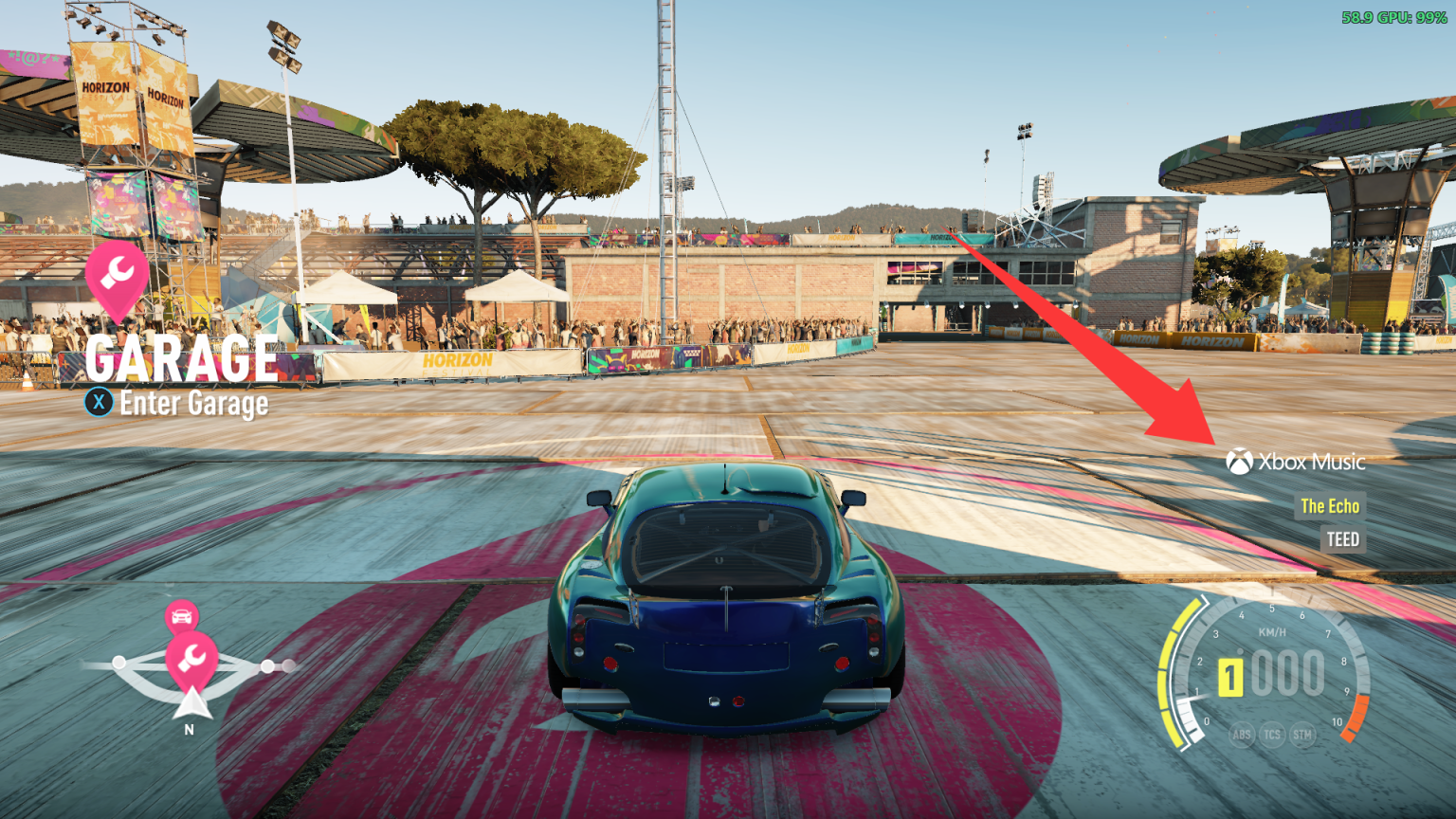
A Forza Horizon 2 (Azimuth) mod that turns on the radio's cut Xbox Music station and plays your own music on it.
Description
XboxMusicRadio
English | 简体中文
A Forza Horizon 2 (Azimuth) mod that turns on the radio's cut Xbox Music station and plays your own music on it.
On Xbox One, FH2 could play your Xbox Music playlists in the car. That service shut down years ago, and on PC the
station was never available. This mod unlocks it and plays your music instead, chosen in the game's Audio Options as
you would have chosen an Xbox Music playlist:
- Your music files: a folder on your PC, each folder in it a playlist (MP3, FLAC, WAV).
- Spotify (Premium), through Spotify's own Spotify Soloist player.
- YouTube Music, NetEase Cloud Music and QQ Music, playing on your PC.
Install
Extract the release zip into the Azimuth folder (next to azimuth.exe):
DWrite.dll                       the FH2 Mod Platform
fh2-mods\XboxMusicRadio.dll      the mod
README.txt, README.zh-CN.txt     this README, in English and Chinese
LICENSE*.txt                     licenses
[!IMPORTANT]
XboxMusicRadio.dllgoes in thefh2-modsfolder, the FH2 Mod Platform's. Don't put it inmods: that folder belongs to Extra Options and holds its plugins, and the mod won't load from there.
Start the game once. It makes an XboxMusicRadio folder next to azimuth.exe with XboxMusicRadio.ini.
Needs Azimuth 1.0.1 or later (it loads the platform as DWrite.dll). Spotify and the music apps need Windows 10
version 2004 or later (the mod records their sound).
Your music files
The station plays the music in your Windows Music folder (C:\Users\<you>\Music, or wherever you moved it):
Music\
    Night Drive\          a playlist called "Night Drive"
        01 - Song.mp3
        Artist - Song.flac
    Rock\                 another playlist (subfolders included)
        Album 1\...
    loose.mp3             files right in Music\ make a playlist called "Music"
- Formats: MP3, FLAC and WAV.
- With more than one playlist there's also All music, every song together. It's what plays until you choose one.
- Titles and artists come from the files' tags. Without tags, from the file name:
Artist - Title.mp3. - To use another folder, set
folder=inXboxMusicRadio.ini, for examplefolder=D:\Songsorfolder=%USERPROFILE%\Desktop\Songs. - New files and folders show up the next time you open Audio Options; no restart needed.
Playing
- In the car, switch the radio to Xbox Music.
- To choose what it plays: Pause > Settings > Audio Options, pick it under Xbox Music, and leave the page. Spotify and the
music apps come first in the list, then your folders. - F6 skips to the next song. You can change the key, or add a controller chord, on the mod's page (Pause > MODS > YOUR MODS >
XboxMusicRadio). - The X button in Audio Options, Refresh Music (the game's "Launch Xbox Music"): it scans the music
folder again, reloads the playlist list (apps you started after the game show up), and if Spotify is chosen, moves
Spotify playback to FH2 Radio and starts it. - With FH2 ANNA, its menu (D-pad down) has Xbox Music Radio: Next
Track, Previous Track, and Playlist to choose what it plays (the same list as Audio Options). It's greyed out
unless the radio is on Xbox Music. A playlist chosen there lasts until the game restarts or you leave Audio
Options.
The game's own Horizon 2 Mix entry (the default Xbox Music playlist on Xbox One) plays all your music files.
The radio display shows the song and artist. It can only show plain letters: accents are dropped, and other scripts
(Chinese, Japanese, ...) don't show there; the log has the full names.
Spotify
With Spotify Premium, the station can play Spotify through Spotify Soloist, Spotify's own headless Spotify
Connect player:
- At developer.spotify.com/dashboard, open Spotify Soloist API Key
and make a key. Put it afterapi_key=under[spotify]inXboxMusicRadio.ini. Keep it private. - Download Soloist for Windows from
Downloads and updates
and putsoloist.exein theXboxMusicRadiofolder. Spotify doesn't allow passing it on, so it isn't in the
mod's zip. Soloist builds expire after 90 days; the log says when it's time for a new one. - Start the game. Pause > Settings > Audio Options: choose Spotify under Xbox Music.
- In the Spotify app (phone or PC, same network), pick the device FH2 Radio and play anything. You only need
to do this the first time: Soloist stays signed in, and from then on the station moves Spotify playback to
FH2 Radio and starts it each time you switch to it (auto_activate=0under[spotify]turns that off).
The mod runs Soloist hidden while the game runs and plays its sound on the station. Choose playlists and songs in the
Spotify app. Soloist's own sound is turned down to -80 dB in the Windows volume mixer, so you only hear it on the
radio. F6 skips, and Spotify pauses while you're on another station and carries on when you come back.
Soloist's login, cache and log (soloist.log) are in XboxMusicRadio\soloist.
Music apps: YouTube Music, NetEase Cloud Music, QQ Music
The station can also play what a music app on your PC plays. Each one is a playlist in Audio Options:
| Playlist | The app |
|---|---|
| YouTube Music | music.youtube.com in a browser (Edge, Chrome, Brave, Vivaldi, Opera, Firefox), or installed from the browser as an app |
| NetEase Cloud Music | the NetEase Cloud Music desktop app (cloudmusic.exe) |
| QQ Music | the QQ Music desktop app (QQMusic.exe) |
- Start the app and play something.
- Pause > Settings > Audio Options: choose it under Xbox Music. NetEase Cloud Music and QQ Music are listed once
they're installed or running.
The mod records the app's sound for the station. While the radio plays it, the app's own sound is turned down to
-80 dB in the Windows volume mixer, so you only hear it on the radio. It's put back as it was when you choose another
playlist or close the game. F6 skips, and the app pauses while you're on another station and carries on when you
come back.
- YouTube Music records the whole browser, so everything it plays is on the radio: keep other tabs quiet, or use a
browser just for it (app=chrome.exeunder[youtube]picks one). - YouTube Music and QQ Music work with Windows' media controls (the ones the media keys use), which give the
song and take the commands. - NetEase Cloud Music doesn't, so the mod reads the song from its window title and drives it with its global
shortcuts. Keep those on in NetEase's settings. If you changed them, setplay_pause_key=,next_key=andprev_key=under[netease]to match, likenext_key=Ctrl+Alt+Right.
Settings
The mod's page, Pause > MODS > YOUR MODS > XboxMusicRadio, has Xbox Music Radio (on/off), Song names from
tags and Shuffle songs, plus the next-song key. The on/off and the two music switches apply after a restart.
Everything is also in XboxMusicRadio\XboxMusicRadio.ini (changes apply the next time the game starts):
| Section | What's in it |
|---|---|
[radio] |
enabled: the mod on or off |
[music] |
folder, read_tags, shuffle, and the next-song key (next_key, next_pad) |
[spotify] |
enabled, api_key, device (the name in the Spotify app), volume, quiet_speakers |
[youtube], [netease], [qqmusic] |
enabled, app (the program, if not the usual one), quiet_speakers, and for NetEase and QQ Music the shortcuts play_pause_key, next_key, prev_key |
[debug] |
trace=1: log every Xbox Music request, the radio's stations and the media sessions Windows lists |
quiet_speakers=0 leaves a player's own sound alone (you'll hear it twice: on the radio and from the player).
With the platform's fh2mod.exe: fh2mod XboxMusicRadio status, next and rescan.
The mod's own text (its page's rows, the X button, the "All music" playlist and the FH2 ANNA menu) is in the game's
language: English, German, French, Spanish, Italian, Japanese, Korean, Traditional Chinese, Polish, Russian, Dutch or
Brazilian Portuguese. With FH2 Mod Platform 2.9.0 or later the page follows the game's language straight away; with
an older platform, and for the next-song key's rows, it follows from the next start after you change the language. Czech and Hungarian stay English, like the game's own text there.
Troubleshooting
The mod logs to fh2-mods\platform.log (lines starting with [XboxMusicRadio]): the music scan, the station turning
on and off, what's chosen and each song it plays.
- Xbox Music isn't among the radio stations. The log should say
Xbox Music hooks on. If it says the hooks failed,
another mod changed the same game code; the log names it. - Silence on the station. Check the log for
playing ...lines. For Spotify and the apps, make sure the player is
actually playing; for Spotify, that the Spotify app plays on FH2 Radio. - The Xbox Music row in Audio Options is grey, or shows Horizon 2 Mix instead of your choice. The game asked the
old Xbox Music service before the mod was ready. The mod notices and asks again (Xbox Music sign-in: ... asked againin the log); if the row stays grey, press X on the Audio Options page. - Spotify stopped working.
Soloist: this soloist.exe has expiredin the log: download the new one. - An app stays silent after the game. The mod puts its sound back when the game closes (a small helper waits for
the game to end), or else the next time the game starts. To fix it by hand: Windows Settings > System > Sound >
Volume mixer, and turn the app back up.
Credits and license
The station itself (unlocking it, building its FMOD stream, routing it through the radio bus, the radio display and
the decoders) is ported from FH2_SpotifyMin, which builds on Bullet4fun's spotify-radio mod
(FH2_ModsCollection). Both are GPL-3.0, so this mod is too: GPL-3.0-or-later, see LICENSE.
Decoders: dr_mp3, dr_flac and dr_wav by David Reid (public domain / MIT-0).
The FH2 Mod Platform is MIT-licensed, with MinHook (BSD 2-Clause) built in.
Spotify Soloist is Spotify's, downloaded from Spotify and run as a separate program; it isn't part of this mod.
Spotify, YouTube Music, NetEase Cloud Music and QQ Music are trademarks of their owners; this mod isn't affiliated with
them.
Building
llvm-mingw (or Visual Studio) with CMake and Ninja:
git submodule update --init
cmake -S . -B build -G Ninja -DCMAKE_BUILD_TYPE=Release
cmake --build build --target xboxmusicradio
From Linux, cross-compile with llvm-mingw and the platform's toolchain file:-DCMAKE_TOOLCHAIN_FILE=platform/cmake/mingw-w64-x86_64.cmake.
GitHub Actions (.github/workflows/build.yml) builds the release zip: run it by hand
(Actions > Build > Run workflow) for a download, or publish a release (tag v + the VERSION in CMakeLists.txt)
and the zip is attached to it.
How it works, with the game addresses and reply layouts: docs/re-notes.md.
Prerequisites
Releases & Changelogs 1
Changed
- Comes with FH2 Mod Platform 2.9.0 (
DWrite.dll). Install it along with the mod. If another mod's zip installed an older platform over it, install this one again. - Settings have moved. With platform 2.9.0, the mod's settings are on its own page: Pause > MODS > YOUR MODS > XboxMusicRadio. Before, they were on the Mods page shared by all mods.
Fixed
- The mod's page is now in the game's language right away. Before, it took one restart after the first start, or after you changed the game's language, for the page to follow. The next-song key's rows still follow from the next start.
Upgrading
Replace DWrite.dll (next to azimuth.exe) and fh2-mods\XboxMusicRadio.dll. Your settings are kept.
Details
- Game / Software
- Forza Horizon 2
- Category
- Scripts
- Latest version
- 1.1.1
- Total downloads
- 0
- Page views
- 2
- First released
- November 1, 2026
- Last updated
- November 19, 2026
Comments 0
No comments yet. Be the first!
Add a YouTube video
Made a showcase or tutorial for this mod? Send the link. It appears in the gallery once it has been approved.
More in Forza Horizon 2